PowerShell Where-Object
The Where-Object cmdlet is used to filter objects from a collection based on specified criteria. It allows you to selectively choose items from the input collection that match a particular condition or set of conditions. The Where-Object cmdlet is often abbreviated as Where for convenience.
Syntax:
Here is the basic syntax of the Where-Object cmdlet:
- <collection> represents the input collection of objects that you want to filter.
- <script block> is a block of PowerShell script code enclosed in curly braces {}. It contains the condition or criteria that each object in the collection must meet for it to be included in the output.
Example 1: Filtering Out Even Numbers
Here's a simple example to illustrate how Where-Object works. Let's say you have an array of numbers, and you want to filter out only the even numbers:
$evenNumbers = $numbers | Where-Object { $_ % 2 -eq 0 }
In this example:
- $_ represents the current object being processed in the collection.
- % is the modulus operator, and -eq is the equality operator.
- The script block { $_ % 2 -eq 0 } checks if each number is even.
The resulting $evenNumbers array will contain only the even numbers from the original collection.
Example 2: Getting Process Details
Here's another example where we filter the collection of process objects to find a process with name ‘winlogon’ and get its details.
In this example:
- Get-Process gets all the processes within your computer.
- Then using Where-Object, we filter the list of processes and select one with the name ‘winlogon’ and the result gets displayed.
Example 3: Getting Running Services Starting With ‘W’
Here's another example where we filter the collection of process objects to find a process with name ‘winlogon’ and get its details.
Get-Service | Where-Object { $_.Status -eq 'Running' -and $_.DisplayName -like 'W*' }
In this example:
- Get-Service gets all the services within your computer.
- Then using Where-Object, we filter the list of services and select ones with the status equal to ‘running’ and service names beginning with ‘W’.
The result should look something like this:

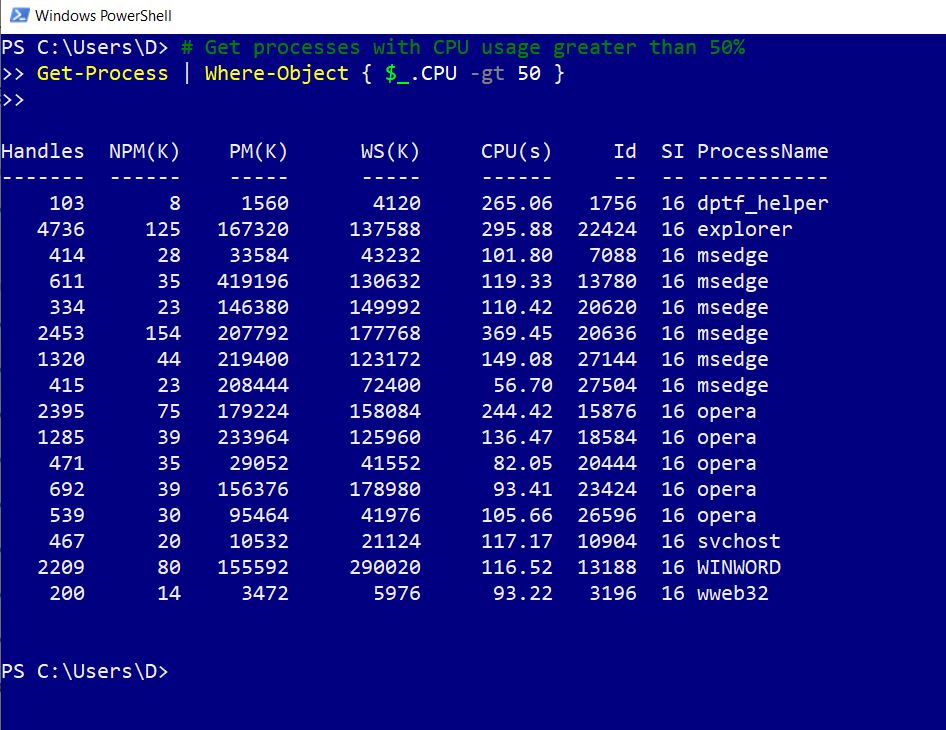
Example 4: Filtering Running Processes with High CPU Usage
Here's another example where we filter the collection of process objects and select only those processes that are having a high CPU usage.
Get-Process | Where-Object { $_.CPU -gt 50 }
In this example:
- Get-Process gets all the processes within your computer.
- Then using Where-Object, we filter the list of processes and select ones whose CPU usage is greater than 50%.
The result should look something like this.
Where-Object is a powerful cmdlet that allows you to filter and select specific items from a collection based on your criteria, making it a valuable tool for PowerShell scripting and automation.


